Styled Paper - Copy this React, Mui Component to your project
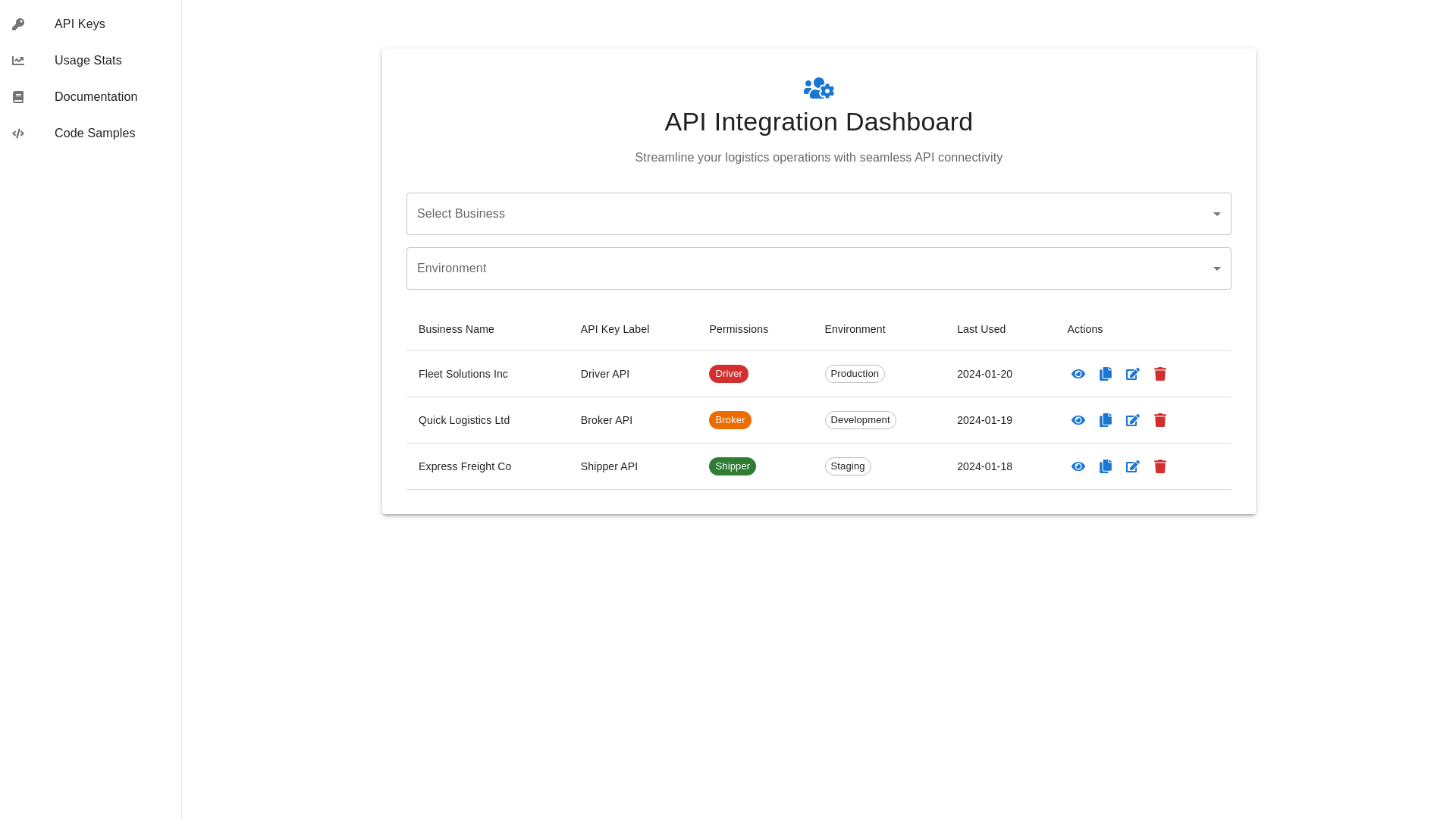
For a comprehensive and adaptable design for an API integration dashboard suitable for a Transportation Management System (TMS) serving diverse logistics stakeholders, the following design elements and content structure can enhance user interaction across desktop, mobile, and tablet: API Integration Dashboard Design Specification General Layout and Content Header: "API Integration Dashboard" Subheader: "Streamline your logistics operations with seamless API connectivity." Overview Section: Description: "Leverage our robust dashboard to integrate your logistics services efficiently. Access comprehensive API documentation, manage API keys, and monitor integration metrics." API Key Management Section: Generate API Key Form: Includes fields for key name, scope, and permissions specific to user roles such as shippers, brokers, carriers, and drivers. API Key List: Display in a table format with columns for API key details, creator, creation date, last usage, and available actions (edit, delete). Documentation and Resources: Quick Start Guide: Offers concise, step-by-step instructions for common API operations. Detailed API Documentation: Thoroughly categorized by user types and functionalities to facilitate easy navigation. Code Samples: Provides practical API call and response examples tailored to each user role. Integration Health Monitoring: API Usage Stats: Visual representations (graphs and charts) of API calls, success rates, and error instances. System Status Indicator: Live updates on the operational status of the API and related systems. Responsive Design Strategies Desktop Version: Layout: Rich interface with a dedicated sidebar for navigation, detailed dashboards for metrics, and expandable sections for in-depth features. Tablet Version: Design: Simplified layout focusing on essential functionalities with easy-to-use collapsible menus and optimized touch interactions. Mobile Version: Interface: Highly condensed design emphasizing immediate access to crucial features like API key management and quick documentation reference. Additional Design Considerations Adaptive Layouts: Implement flexible grids and media queries to ensure responsiveness and functionality across all devices. Consistent Styling: Maintain a uniform design language with consistent typography, color schemes, and element styling to ensure a cohesive user experience. Interactive Elements: Include interactive data visualizations for statistics and dynamic sections for enhanced navigation on smaller screens. Accessibility Compliance: Ensure full accessibility with appropriate color contrast, text scaling, and screen reader support. Enhanced Security Measures: Apply best practices in security, such as encrypted data transmission and multi-factor authentication options, to protect user data and API keys. This structured approach to the API integration dashboard ensures optimal functionality and user experience, accommodating the specific needs of various stakeholders in the logistics sector while maintaining a high standard of usability and security across all platforms.