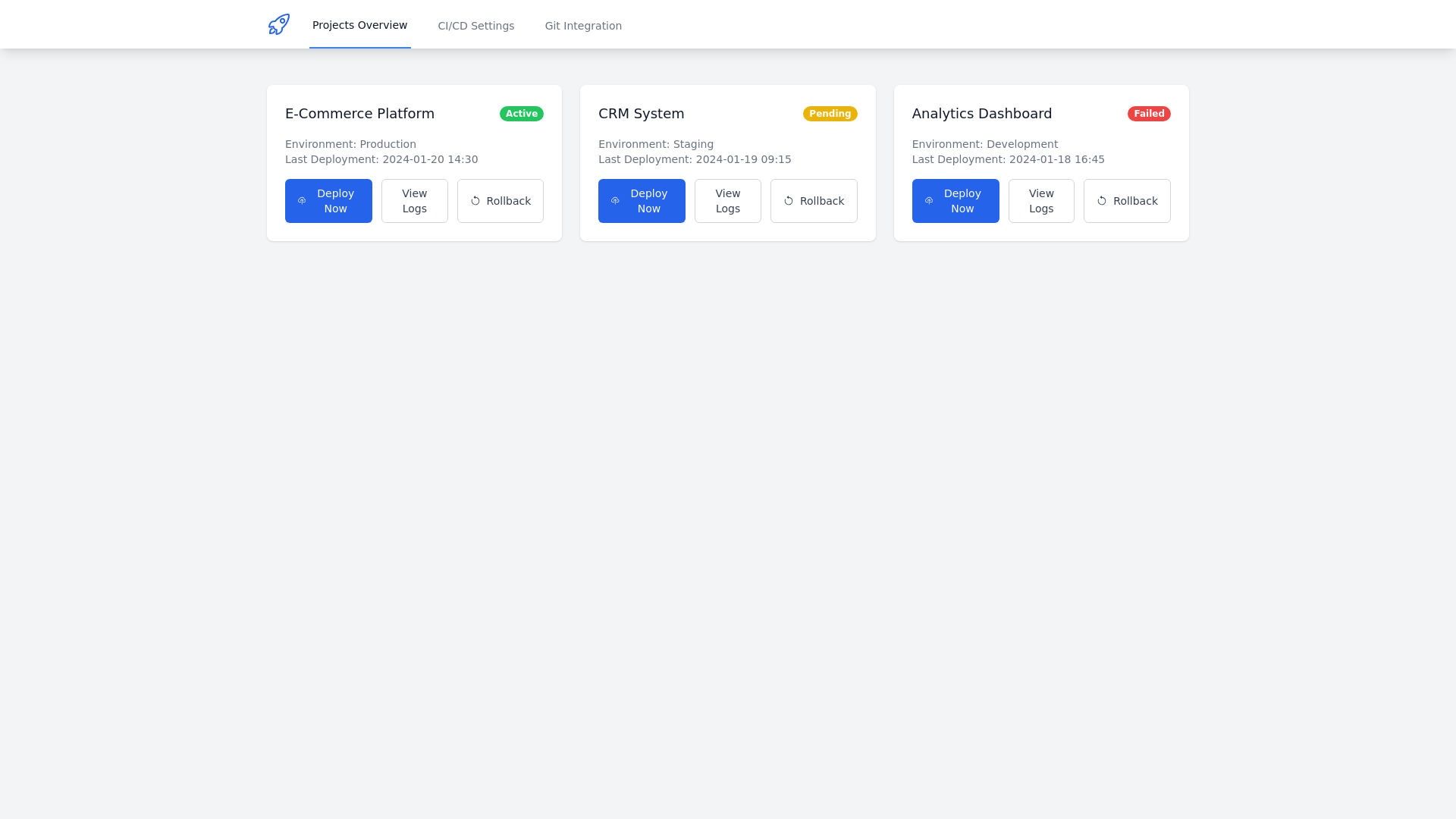
Deployment Dashboard - Copy this React, Tailwind Component to your project
###-**UI/UX-Design-for-Deployment-Automation**-The-**Deployment-Automation**-feature-is-designed-to-provide-users-with-an-intuitive,-seamless,-and-efficient-experience-when-deploying-applications.-Below-is-a-detailed-breakdown-of-the-UI/UX-design:-----###-**1.-Dashboard-Overview**---**Purpose:**-Offer-users-a-centralized-view-of-all-deployment-related-actions-and-statuses.---**Design:**---**Primary-Section:**-A-clear,-interactive-card-or-tile-layout-for-each-active-project-showing:---Project-name.---Current-deployment-environment-(e.g.,-AWS,-Google-Cloud,-Azure,-Vercel).---Deployment-status-(e.g.,-"In-Progress,"-"Success,"-"Failed").---Last-deployment-date-and-time.---**Quick-Action-Buttons:**---**Deploy-Now:**-Trigger-a-manual-deployment.---**View-Logs:**-Access-detailed-deployment-logs.---**Rollback:**-Revert-to-the-previous-version.---**Global-Navigation:**-A-persistent-top-or-side-navigation-bar-with-links-to:---Projects-Overview.---CI/CD-Settings.---Git-Integration-Settings.-----###-**2.-One-Click-Deployment-Interface**---**Purpose:**-Allow-users-to-deploy-applications-to-various-cloud-platforms-with-minimal-effort.---**Design:**---**Project-Selection-Page:**-A-dropdown-or-search-bar-to-select-the-project-to-deploy.---**Cloud-Platform-Selector:**---Radio-buttons-or-a-dropdown-to-choose-between-AWS,-Google-Cloud,-Azure,-or-Vercel.---Display-relevant-details-about-each-platform-(e.g.,-region,-environment-type).---**Deploy-Button:**-Prominently-placed,-styled-for-visibility,-with-a-loading-animation-and-confirmation-modal-to-reduce-accidental-deployments.---**Feedback-Mechanism:**---Deployment-progress-visualized-through-a-progress-bar-or-status-indicator.---Success-message-upon-completion-with-options-to:---View-Live-Application.---Copy-Deployment-URL.---Error-messages-with-detailed-logs-and-retry-options.-----###-**3.-CI/CD-Pipeline-Configuration**---**Purpose:**-Enable-users-to-configure-and-manage-automated-deployment-pipelines.---**Design:**---**Pipeline-Dashboard:**---List-of-pipelines-for-each-project-with-tags-for-statuses-(e.g.,-"Active,"-"Paused").---Buttons-for-actions-like-"Edit,"-"Disable,"-or-"Delete."---**Pipeline-Creation-Wizard:**---**Step-1:**-Select-Project-and-Branch-(e.g.,-main,-dev).---**Step-2:**-Choose-Build-and-Deployment-Triggers:---Push-to-branch.---Pull-request-merged.---**Step-3:**-Configure-Build-Tools-and-Environment-Variables:---Node.js,-Python,-Java,-etc.---Fields-for-key-value-pairs.---**Step-4:**-Set-Post-Deployment-Actions:---Notification-preferences-(email,-Slack,-etc.).---Webhook-configuration.---**Real-Time-Logs:**-Stream-pipeline-execution-logs-with-filtering-and-search-functionality.-----###-**4.-Version-Control-with-Git-Integration**---**Purpose:**-Provide-seamless-integration-with-Git-for-source-control-and-deployment-management.---**Design:**---**Integration-Setup-Page:**---Authentication-options-for-GitHub,-GitLab,-or-Bitbucket.---OAuth-authentication-flow-for-secure-linking.---Repository-selection-dropdown-or-search-field.---**Version-History-View:**---Timeline-interface-showing-recent-commits,-authors,-and-commit-messages.---Buttons-to:---Deploy-a-specific-commit.---View-differences-between-two-commits-(diff-view).---**Branch-Management-Panel:**---List-all-branches-with-indicators-for-active-pipelines-or-recent-deployments.---Buttons-for-merging,-deleting,-or-viewing-specific-branches.-----###-**5.-Mobile-Friendly-Design**---**Purpose:**-Ensure-users-can-deploy-and-manage-applications-on-the-go.---**Design:**---**Responsive-Dashboard:**-Condensed-card-views-for-smaller-screens.---**Simplified-Deployment-Flow:**-Streamlined-steps-with-collapsible-menus.---**Real-Time-Notifications:**-Push-notifications-for-deployment-status-updates.-----###-**6.-User-Onboarding-and-Support**---**Purpose:**-Make-it-easy-for-new-users-to-get-started-with-deployment-automation.---**Design:**---**Interactive-Tutorials:**-Step-by-step-guidance-for-setting-up-a-deployment.---**Tooltips-and-Help-Icons:**-Brief-explanations-of-technical-terms-and-features.---**Support-Integration:**---"Contact-Support"-button-with-live-chat-or-ticket-submission.---Links-to-detailed-documentation-and-FAQs.-----###-**7.-Advanced-Settings-and-Customization**---**Purpose:**-Allow-experienced-users-to-tailor-deployments-to-their-specific-needs.---**Design:**---**Advanced-Settings-Tab:**---Custom-build-scripts-and-environment-variable-management.---Manual-configuration-for-deployment-parameters-like-caching-and-timeouts.---**Access-Control-Management:**-Role-based-access-for-team-members.-----###-**8.-Aesthetic-and-Accessibility-Considerations**---**Visual-Design:**---Clean,-modern-interface-with-consistent-color-schemes-for-different-statuses-(e.g.,-green-for-success,-red-for-failure).---Use-of-icons-and-visual-indicators-for-quick-comprehension.---**Accessibility:**---Keyboard-navigability-and-screen-reader-support.---High-contrast-mode-for-better-visibility.-----This-comprehensive-UI/UX-design-ensures-that-Deployment-Automation-is-user-friendly,-efficient,-and-accessible-to-developers-of-all-skill-levels.