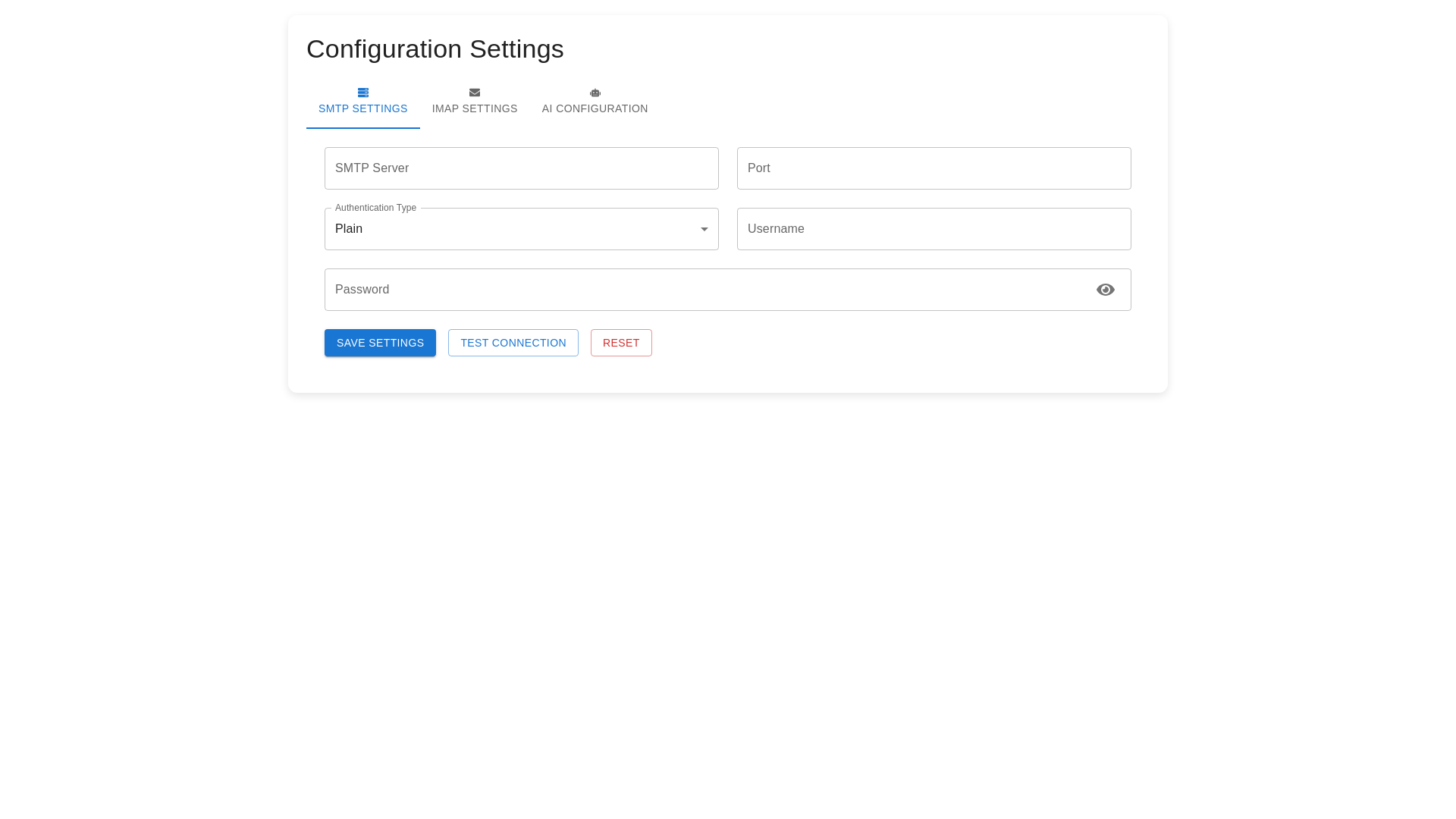
Styled Paper - Copy this React, Mui Component to your project
Import React, { useState, useCallback } from "react"; import { Box, Container, Tab, Tabs, Typography, Paper, TextField, Button, Select, MenuItem, FormControl, InputLabel, Grid, IconButton, InputAdornment, Alert, Tooltip, CircularProgress } from "@mui/material"; import { styled } from "@mui/system"; import { FiMail, FiCpu, FiEye, FiEyeOff, FiRefreshCw, FiHelpCircle } from "react icons/fi"; import debounce from "lodash/debounce"; const StyledPaper = styled(Paper)(({ theme }) => ({ padding: "24px", marginBottom: "24px", borderRadius: "12px", boxShadow: "0 4px 12px rgba(0, 0, 0, 0.1)" })); const Settings = () => { const [activeTab, setActiveTab] = useState(0); const [showPassword, setShowPassword] = useState(false); const [showApiKey, setShowApiKey] = useState(false); const [loading, setLoading] = useState(false); const [status, setStatus] = useState({ type: "", message: "" }); const [emailConfig, setEmailConfig] = useState({ smtpServer: "", smtpPort: "", authType: "none", username: "", password: "" }); const [aiConfig, setAiConfig] = useState({ model: "gpt 3.5", apiKey: "", customModel: "" }); const [imapConfig, setImapConfig] = useState({ imapServer: "", imapPort: "", imapAuthType: "none", imapUsername: "", imapPassword: "" }); const handleEmailChange = (field) => (event) => { setEmailConfig({ ...emailConfig, [field]: event.target.value }); }; const handleAIChange = (field) => (event) => { setAiConfig({ ...aiConfig, [field]: event.target.value }); }; const handleImapChange = (field) => (event) => { setImapConfig({ ...imapConfig, [field]: event.target.value }); }; const validateEmailConfig = useCallback( debounce(() => { const isValid = emailConfig.smtpServer && emailConfig.smtpPort && emailConfig.username && emailConfig.password; return isValid; }, 300), [emailConfig] ); const validateAIConfig = useCallback( debounce(() => { const isValid = aiConfig.model && aiConfig.apiKey; return isValid; }, 300), [aiConfig] ); const handleTestConnection = async () => { setLoading(true); try { // Simulated API call await new Promise(resolve => setTimeout(resolve, 2000)); setStatus({ type: "success", message: "Connection tested successfully!" }); } catch (error) { setStatus({ type: "error", message: "Connection test failed. Please check your settings." }); } finally { setLoading(false); } }; const handleSaveConfig = async () => { setLoading(true); try { // Simulated API call await new Promise(resolve => setTimeout(resolve, 1500)); setStatus({ type: "success", message: "Configuration saved successfully!" }); } catch (error) { setStatus({ type: "error", message: "Failed to save configuration." }); } finally { setLoading(false); } }; const handleReset = () => { if (activeTab === 0) { setEmailConfig({ smtpServer: "", smtpPort: "", authType: "none", username: "", password: "" }); setImapConfig({ imapServer: "", imapPort: "", imapAuthType: "none", imapUsername: "", imapPassword: "" }); } else { setAiConfig({ model: "gpt 3.5", apiKey: "", customModel: "" }); } setStatus({ type: "", message: "" }); }; return ( <Container maxWidth="lg" sx={{ py: 4 }}> <Typography variant="h4" gutterBottom sx={{ mb: 4 }}> Settings Configuration </Typography> <Tabs value={activeTab} onChange={(e, newValue) => setActiveTab(newValue)} sx={{ mb: 4 }} > <Tab icon={<FiMail />} label="Email Configuration" /> <Tab icon={<FiCpu />} label="AI Configuration" /> </Tabs> {activeTab === 0 && ( <StyledPaper> <Typography variant="h6" gutterBottom>SMTP Settings</Typography> <Grid container spacing={3}> <Grid item xs={12} md={6}> <TextField fullWidth label="SMTP Server Address" value={emailConfig.smtpServer} onChange={handleEmailChange("smtpServer")} helperText="Enter your SMTP server address" /> </Grid> <Grid item xs={12} md={6}> <TextField fullWidth label="SMTP Port" type="number" value={emailConfig.smtpPort} onChange={handleEmailChange("smtpPort")} helperText="Enter your SMTP port number" /> </Grid> <Grid item xs={12} md={6}> <FormControl fullWidth> <InputLabel>Authentication Type</InputLabel> <Select value={emailConfig.authType} onChange={handleEmailChange("authType")} > <MenuItem value="none">None</MenuItem> <MenuItem value="ssl">SSL</MenuItem> <MenuItem value="tls">TLS</MenuItem> </Select> </FormControl> </Grid> <Grid item xs={12} md={6}> <TextField fullWidth label="Username" value={emailConfig.username} onChange={handleEmailChange("username")} /> </Grid> <Grid item xs={12} md={6}> <TextField fullWidth label="Password" type={showPassword ? "text" : "password"} value={emailConfig.password} onChange={handleEmailChange("password")} InputProps={{ endAdornment: ( <InputAdornment position="end"> <IconButton onClick={() => setShowPassword(!showPassword)} edge="end" > {showPassword ? <FiEyeOff /> : <FiEye />} </IconButton> </InputAdornment> ) }} /> </Grid> </Grid> {/* Added: IMAP Configuration Section */} <Typography variant="h6" gutterBottom sx={{ mt: 4 }}>IMAP Settings</Typography> <Grid container spacing={3}> <Grid item xs={12} md={6}> <TextField fullWidth label="IMAP Server Address" value={imapConfig.imapServer} onChange={handleImapChange("imapServer")} helperText="Enter your IMAP server address" /> </Grid> <Grid item xs={12} md={6}> <TextField fullWidth label="IMAP Port" type="number" value={imapConfig.imapPort} onChange={handleImapChange("imapPort")} helperText="Enter your IMAP port number" /> </Grid> <Grid item xs={12} md={6}> <FormControl fullWidth> <InputLabel>IMAP Authentication Type</InputLabel> <Select value={imapConfig.imapAuthType} onChange={handleImapChange("imapAuthType")} > <MenuItem value="none">None</MenuItem> <MenuItem value="ssl">SSL</MenuItem> <MenuItem value="tls">TLS</MenuItem> </Select> </FormControl> </Grid> <Grid item xs={12} md={6}> <TextField fullWidth label="IMAP Username" value={imapConfig.imapUsername} onChange={handleImapChange("imapUsername")} /> </Grid> <Grid item xs={12} md={6}> <TextField fullWidth label="IMAP Password" type={showPassword ? "text" : "password"} value={imapConfig.imapPassword} onChange={handleImapChange("imapPassword")} InputProps={{ endAdornment: ( <InputAdornment position="end"> <IconButton onClick={() => setShowPassword(!showPassword)} edge="end" > {showPassword ? <FiEyeOff /> : <FiEye />} </IconButton> </InputAdornment> ) }} /> </Grid> </Grid> <Box sx={{ mt: 4, display: "flex", gap: 2 }}> <Button variant="contained" onClick={handleTestConnection} disabled={loading} startIcon={loading ? <CircularProgress size={20} /> : <FiRefreshCw />} > Test Connection </Button> <Button variant="contained" color="primary" onClick={handleSaveConfig} disabled={loading} > Save Configuration </Button> <Button variant="outlined" color="error" onClick={handleReset} disabled={loading} > Reset </Button> </Box> </StyledPaper> )} {activeTab === 1 && ( <StyledPaper> <Grid container spacing={3}> <Grid item xs={12} md={6}> <FormControl fullWidth> <InputLabel>AI Model</InputLabel> <Select value={aiConfig.model} onChange={handleAIChange("model")} > <MenuItem value="gpt 3.5">OpenAI GPT 3.5</MenuItem> <MenuItem value="gpt 4">OpenAI GPT 4</MenuItem> <MenuItem value="claude">Claude</MenuItem> <MenuItem value="gemini">Gemini</MenuItem> <MenuItem value="anthropic">Anthropic</MenuItem> <MenuItem value="custom">Custom Model</MenuItem> </Select> </FormControl> </Grid> {aiConfig.model === "custom" && ( <Grid item xs={12} md={6}> <TextField fullWidth label="Custom Model Name" value={aiConfig.customModel} onChange={handleAIChange("customModel")} /> </Grid> )} <Grid item xs={12} md={6}> <TextField fullWidth label="API Key" type={showApiKey ? "text" : "password"} value={aiConfig.apiKey} onChange={handleAIChange("apiKey")} InputProps={{ endAdornment: ( <InputAdornment position="end"> <Tooltip title="Keep your API key secure"> <IconButton onClick={() => setShowApiKey(!showApiKey)} edge="end" > {showApiKey ? <FiEyeOff /> : <FiEye />} </IconButton> </Tooltip> </InputAdornment> ) }} /> </Grid> </Grid> <Box sx={{ mt: 4, display: "flex", gap: 2 }}> <Button variant="contained" color="primary" onClick={handleSaveConfig} disabled={loading} > Save API Configuration </Button> <Button variant="outlined" color="error" onClick={handleReset} disabled={loading} > Reset </Button> </Box> </StyledPaper> )} {status.message && ( <Alert severity={status.type} onClose={() => setStatus({ type: "", message: "" })} sx={{ mt: 2 }} > {status.message} </Alert> )} </Container> ); }; export default Settings; Adapt the code to have 3 tabs. one for SMTP settings, one for IMAP setting and one for IA settings